
- 0xdurakiDocumenting Electronic Projects
WireWiz (Cable Documentation)
WireViz is a tool for easily documenting cables, wiring harnesses and connector pinouts. It takes plain text, YAML-formatted files as input and produces beautiful graphical output (ie. SVG, PNG, …). It can also handle automatic BOM (Bill of Materials) creation and has a lot of extra features.
Install instructions:
$ cd utils/clone
$ git clone git@github.com:wireviz/WireViz.git
# $ git checkout <tag>/<branch>
$ cd WireWiz
$ python3 -m venv path/to/venv
$ source path/to/venv/bin/activate
$ python3 -m pip install -e .
##  => $ path/to/venv/bin/wireviz --help
To use it, simply provide *.yaml definition file following Wirewiz format and the Python script will output the graphical representation using GraphViz:
# Depending on the options specified, this will output selected/all graphic files (svg,png,...)
$ wireviz ~/path/to/file/mywire.yml

# Wildcards in the file path (*.yaml) are also supported to process multiple files at once
$ wireviz ~/path/to/files/*.yml

# To see how to specify the output formats, as well as additional options, run:
$ wireviz --help
WireWiz Definition Files
Example Demo: #1:
connectors:
  X1:
    type: D-Sub
    subtype: female
    pinlabels: [DCD, RX, TX, DTR, GND, DSR, RTS, CTS, RI]
  X2:
    type: Molex KK 254
    subtype: female
    pinlabels: [GND, RX, TX]

cables:
  W1:
    gauge: 0.25 mm2
    length: 0.2
    color_code: DIN
    wirecount: 3
    shield: true

connections:
  -
    - X1: [5,2,3]
    - W1: [1,2,3]
    - X2: [1,3,2]
  -
    - X1: 5
    - W1: s
Will produce the following image:
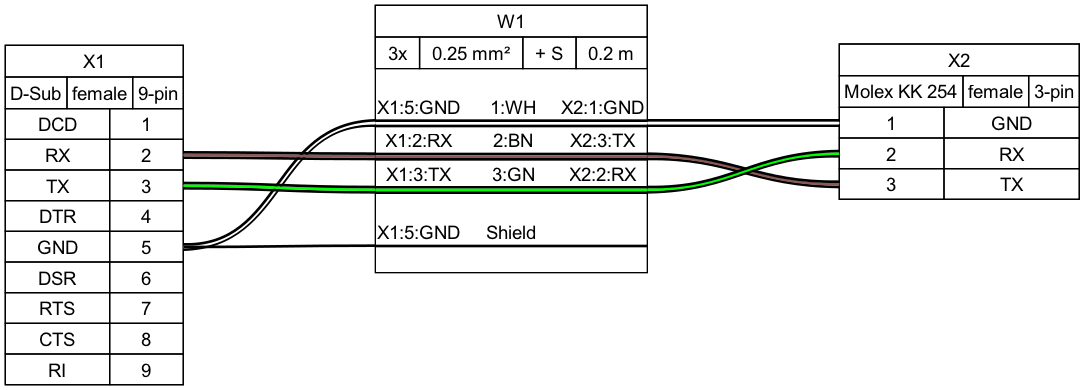 WireWiz - YAML Producing Output for Example #1
Check more examples in official GitHub - Examples README file and samples. There is also a tutorial explaining from bare minimal YAML definition to a more complex wiring systems implemented and case shown.
The WireWiz syntax is heavily documented, while also offering additional options when using images in YAML defs.
There is also a simple GUI wrapper for WireWiz developed for WindowsNT.
Pinout (Hardware Pinout Documentation)
The Pinout is an open-source Python package that generates hardware pinout diagrams to SVG format.
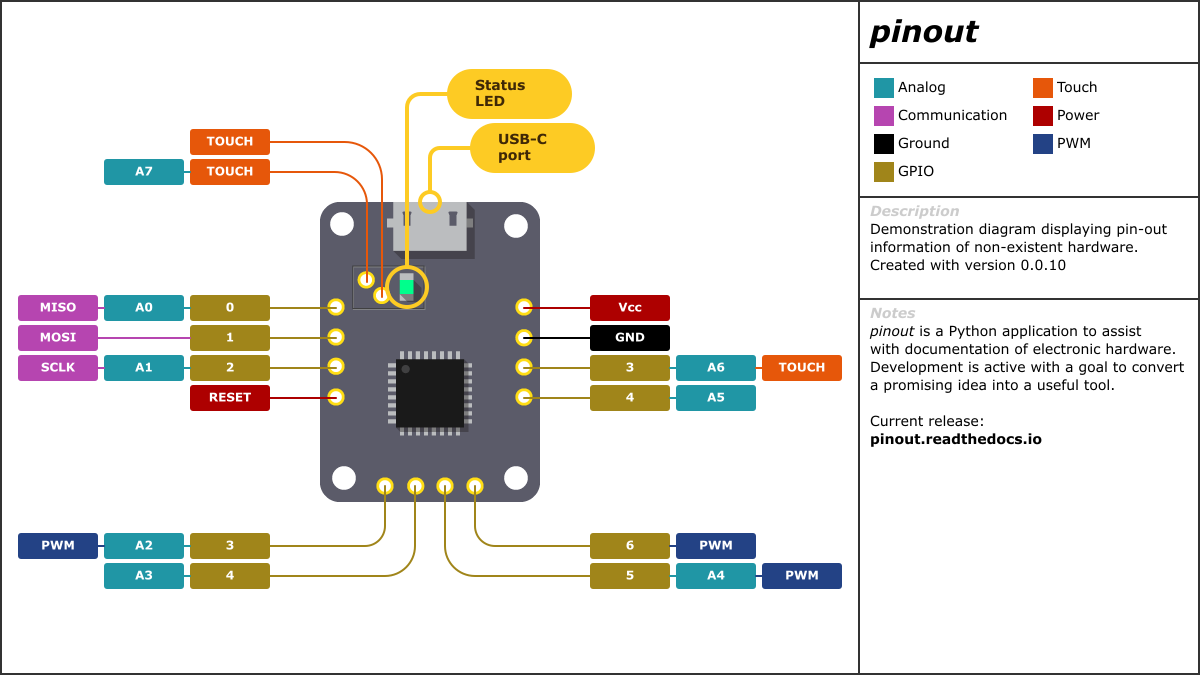 Pinout - Producing Output from README
InteractiveHtmlBom (BOM Documentation)
Interactive HTML BOM generation plugin for KiCad, EasyEDA, Eagle, Fusion360 and Allegro PCB designer. This plugin generates a convenient Bill of Materials (BOM) listing with the ability to visually correlate and easily search for components and their placements on the PCB.
Electric Symbols (Symbols Documentation)
WaveDrom (Digital Timing Diagram Documentation)
WaveDrom is a Digital Timing Diagram generation system. WaveDrom draws your Timing Diagram or Waveform from simple textual description. It comes with description language, rendering engine and the editor. WaveDrom editor works in the browser or can be installed on your system. Rendering engine can be embeded into any webpage.
Circuits (Electrical PCB and Circuits Documentation)
tscircuit is an open-source React/Typescript electronics toolchain and ecosystem for creating, previewing, simulating and manufacturing Printed Circuit Boards (PCBs).
- Quickstart for web, for CLI, and for ChatGPT/AI
Gerber Viewers are used to view “gerber” files. Some of the software solutions for geber file viewing is shown on the linked GitHub repository.
EDA are embedded development applications that are used to design schematics and embedded device systems.